EXP_001 · 24 Oct 2026
HypeHound: an AI newsletter pipeline
Building a local AI pipeline that ingests newsletters, classifies and summarises them, and turns the result into a digest and a podcast
The pipeline publishes a live episode page at hypehound.dev.
AUDIO
13 min — single-call (16% item coverage)AUDIO
2 hr 14 min — per-category (100% item coverage)I subscribe to a lot of newsletters. TLDR, The Pragmatic Engineer, Bytes, a handful of security digests. By the time I sit down in the morning, my inbox looks like someone tipped a recycling bin on a keyboard. I read maybe a third of it, skim another third, and quietly ignore the rest.
The problem is not the volume. The problem is that the interesting links are buried in promotional boilerplate, tracking redirects, and copy-paste filler. I wanted something that could quietly sit in the background, strip the noise, group related items, and hand me a clean summary when I am ready. That is HypeHound.
At a glance
What: A local-first pipeline that turns newsletter email into structured, cited digests and narrated audio — fully automated, no cloud AI required.
Stack: Python · PydanticAI · pydantic-graph · SQLite · Resend · LM Studio / Ollama · Qwen3-TTS
Key engineering decisions:
- Chunk newsletters at section boundaries before classification — one LLM call per chunk, not one per newsletter
- Constrain citations to URLs that actually existed in the source email — the model cannot hallucinate a link
- Validate every LLM output against a Pydantic schema with automatic retries
- Key ingestion on
Message-ID— idempotent and crash-safe by design - Route classification and digest to separate inference workloads to fit local hardware memory
- One LLM call per digest category rather than one per full digest — coverage goes from ~16% to ~100%
Across 18 newsletters processed so far, the pipeline reduces 282,402 characters of raw newsletter text to 37,715 characters of structured summaries — 7.5× compression — before the digest step runs. Early sample; the ratio is expected to hold.
The problem with email
Email is a poor substrate for structured data — every sender uses a different template, subject
lines are not reliable identifiers, and tracking links expire the moment a campaign ends. That
awkwardness shapes almost every decision in the pipeline. The hard rule that fell out of it: use
the Message-ID header as the deduplication key, since it is the only one email standards require
to be globally unique. Everything else — including how to handle tracking URLs — turned out to
need more thought, as described later.
The pipeline
 Resend mailbox
       │  cron poll
       ▼
    Ingest ──── dedup by Message-ID ──── SQLite (emails)
       │
       ▼
     Parse ──── HTML → text, extract URLs
       │
       ▼
  Classify ──── PydanticAI + schema validation ──── SQLite (items)
       │         one call per ~600-word chunk
       ▼
    Digest ──── group by category, LLM prose ──── SQLite (digests)
       │         one call per category
       ▼
   Podcast ──── script → Voicebox TTS → M4A
       │
       ▼
   Publish ──── episode HTML + audio → GitHub Release
       │
       ▼
    Deploy ──── Astro build → Cloudflare Pages (hypehound.dev)
Resend acts as the managed inbox. Newsletters are forwarded there, and I poll via their API. This keeps the infrastructure simple: no mail server to maintain, no IMAP quirks to work around. The SDK gives me threads and emails as JSON, and I walk them in order.
For parsing, markdownify converts HTML to text in a way that preserves the structure of the
newsletter without dragging along the CSS and tracking pixels. BeautifulSoup handles URL
extraction beforehand so I can do the redirect resolution pass separately.
State management
The pipeline is built on pydantic-graph’s GraphBuilder. Each stage — Fetch, Pick, Save,
Classify, Store, BuildDigest — is a BaseNode subclass, and each node’s run method
returns the next node to visit, or End to terminate. GraphBuilder compiles these into a typed,
validated graph at startup. Execution order is not a hardcoded list; it emerges from what each
node returns at runtime. If Fetch finds no new emails, it returns End immediately and the
remaining ingest nodes are never touched.
All mutable data shared across nodes travels in a single PipelineState Pydantic model that the
graph threads through every call. Because it is Pydantic, the state is validated on construction
and straightforward to inspect or serialise mid-run.
SQLite sits underneath for anything that needs to survive between runs: the raw ingestion log,
classified items, and generated digests. The emails table is append-only, keyed on message_id,
so a crash mid-pipeline leaves no inconsistency — the next run skips what is already there and
picks up the rest.
Classification
This is where it gets interesting. A single newsletter issue from TLDR might have fifteen or twenty distinct items covering AI, DevTools, security, and random industry news, all in a single HTML blob. A flat call to an LLM with the full text would invite the model to either miss items or conflate them.
My solution is to split the newsletter at section boundaries first — markdown headers and horizontal
rules, which newsletters surprisingly often use — and cap each chunk at around six hundred words.
Each chunk goes to PydanticAI as a separate call. PydanticAI handles retries and validates the
output against the schema so I always get back a proper list of NewsletterItem objects, or an
error I can handle.
Each item has a category, a one-line headline, a two or three sentence summary, and a list of citations. Citations are only populated from the URL map extracted from the original email, so the model cannot hallucinate a URL — it can only reference one that actually existed in the email. After chunking there is a deduplication pass by headline, because a long newsletter sometimes repeats items across adjacent sections.
Digests
The digest is time-based, not threshold-based. The plan is a cron job firing the pipeline daily; it pulls every classified item that has not been included in a previous digest. Items are grouped by category, and for each category the LLM writes a brief intro sentence plus a clean list of items. The category prose and all citation URLs are carried through to the output.
The digest is stored in SQLite as JSON and also written to disk as a versioned Markdown file.
If I run the digest twice in a day (usually because I am testing), the second run writes
digest_2026-10-24_v2.md
A typical digest Markdown file looks roughly like this:
HypeHound Digest
Period: 23 Oct 2026 — 24 Oct 2026
AI / ML
This week’s AI stories cover a new compact reasoning model and a significant update to a popular open-weight family.
OpenAI releases o4-mini
A smaller, faster reasoning model aimed at coding and maths tasks. Benchmarks show competitive performance with o3 at a fraction of the cost, making it practical for high-volume pipelines.
Meta releases Llama 4 Scout and Maverick
Llama 4 Scout is a 17B active-parameter MoE model that fits in a single GPU; Maverick is the larger 400B variant. Both support a 10M token context window, which opens up whole-repo analysis and long-document summarisation as practical use cases.
Security
Critical RCE in popular npm package
A deserialization flaw in a widely used JSON schema validator allows remote code execution when processing untrusted input. Patch is available; all versions below 4.12.1 are affected.
DevTools
Cursor adds background agent mode
Cursor’s background agent runs tasks asynchronously in a sandboxed environment while you continue working. Early access is rolling out to Pro users this week.
The structured data behind each item — before it is rendered into prose — looks like this:
How the pipeline compresses content
A useful way to understand what the pipeline actually does is to look at what goes in and what comes out at each stage.
Across 18 newsletters ingested so far:
| Stage | Count | Total chars | Avg per unit |
|---|---|---|---|
| Raw newsletter text | 18 emails | 282,402 | 15,689 / email |
| Classified summaries | 125 items | 37,715 | 302 / item |
| Digest (all categories) | 1 digest | 60,257 | — |
Raw newsletters average around 15,700 characters each — roughly 3,100 words of newsletter prose, boilerplate, headers, and filler. The classifier distils each newsletter down to roughly 7 items, each with a two-to-three sentence summary of around 300 characters. Across 18 newsletters that is a reduction from 282,402 characters to 37,715 — just over 7.5× compression — before the digest step even runs.
The digest is larger than the raw summary total because the LLM adds category introductions and structures the output as a readable document rather than a flat list.
The compression ratio is not the point. The point is that the output is dense. A 300-character summary captures the what and the why of a news item — the original article URL is preserved, so following up is always possible — but it strips everything that made the original newsletter long: the inline advertising, the section padding, the repeated calls to action.
The next planned feature is a depth parameter: a per-run setting that controls how much of the original item text is preserved through to the digest and podcast. A shallow setting (the default today) produces the dense summary above. A deep setting would instruct the summariser to retain more context and allow the digest prose to expand accordingly. The two audio samples in the next section show what that difference looks like in practice at the output end.
The podcast step
The podcast is the part that still surprises me every time I hear it.
The digest is converted into a spoken script and then synthesised to audio. There is a single-narrator mode and a dual-narrator mode with two configurable hosts who build on each other’s paragraphs. The format constraint is strict: each host turn must be at least three to six sentences, not a back-and-forth of one-liners.
Audio synthesis runs through Voicebox, a local TTS server backed by Qwen3-TTS. Voicebox exposes an OpenAI-compatible endpoint so the pipeline treats it the same way it treats the inference layer.
The LLM output is parsed into a PodcastScript and written to disk as JSON before synthesis
begins. This means a failed TTS run can be retried from the saved script without re-running
the LLM step.
Each PodcastSegment becomes one POST /synthesize request to Voicebox. In dual-narrator mode,
consecutive lines from the same speaker are grouped into a single request so the voice model
renders them with natural continuity — the speaker doesn’t reset between sentences.
Each synthesised segment is written to disk as a WAV file immediately. This means a TTS run that crashes halfway through can be resumed — already-synthesised segments are detected by filename and skipped, so the pipeline picks up from where it left off rather than re-generating everything from scratch.
Stitching
Once all segments are synthesised, they are concatenated into a single M4A using ffmpeg’s concat filter with a short silence between each segment. This is where the longer 100%-coverage format hit a constraint that the 13-minute version never triggered.
With 129 segments plus a silence gap between each, the naive approach opens all ~260 input files
in a single ffmpeg invocation. macOS has a per-process open-file limit of 256 by default. The
process fails at around segment 126 with Too many open files and leaves no audio output.
The fix is progressive stitching: process inputs in chunks of 64, merge each chunk into a temporary WAV, then do a final pass over the merged chunks to produce the encoded M4A. At any point only 64 files are open simultaneously. The two-pass approach adds a few seconds of overhead for large episodes but scales to arbitrarily long podcasts.
A second issue surfaced once the chunking was in place: ffmpeg calls are blocking, and the
synthesis pipeline runs inside an async Textual worker. A blocking subprocess call holds the event
loop hostage, which means log lines and TUI updates are queued but not rendered until ffmpeg
returns. Offloading the stitch to a thread executor (run_in_executor) releases the loop so the
interface stays live during the encode.
The compression problem
My first implementation fed the entire digest to a single LLM call with a system prompt asking for a twelve to eighteen minute script. That sounds reasonable until you audit the output against the digest.
A busy day’s digest can contain over a hundred items. At 1,800 words — the lower bound of the length budget — that is fewer than twenty words per item. The model cannot comply with both “cover every item” and “stay under 1,800 words”, so it silently resolves the conflict by picking the fifteen or so most interesting stories and ignoring the rest. On one run I measured, a 104-item digest produced a script that covered 17 items — 16% coverage — with no indication that anything had been skipped.
The fix is structural rather than prompt-engineering. Instead of one call over the full digest, the pipeline now makes one call per digest category. Each call receives only that category’s items and an explicit item count in the prompt: “cover all 7 items”. The model can reliably count to seven. It cannot reliably count to a hundred and four while simultaneously writing a coherent script.
All the per-category segments are concatenated into a single PodcastScript. The first category
prompt includes the show greeting; the last includes the sign-off. The result sounds like one
continuous episode. With around fifteen categories in a typical digest, this trades one large
generation for fifteen small ones, but the coverage goes from ~16% to effectively 100%.
Local inference
All LLM calls run locally. The provider is abstracted behind a thin wrapper that reads
INFERENCE_BASE_URL and INFERENCE_MODEL from the environment, so the pipeline does not care
whether it is talking to LM Studio, Ollama, or any other OpenAI-compatible endpoint.
Running everything locally means I am comfortable giving access to my personal inbox, albeit it’s a dedicated account that only receives newsletters.
The downside is throughput. Classifying a long newsletter with many chunks takes a few minutes, and the digest step adds more. I run the pipeline as a cron job overnight so this does not matter in practice. But it is a real constraint if you wanted near-real-time processing.
Inference architecture: LM Studio to Ollama
The pipeline has two structurally different workloads, and they need different things from the inference layer.
Classification is parallel. Each item is independent, so the ideal setup is several requests
in flight simultaneously. LM Studio processes requests serially and queues the rest. Ollama’s
OLLAMA_NUM_PARALLEL setting allows concurrent requests on the same loaded model — on a 64 GB
unified memory machine, setting this to 4 or 5 with a 14B model is comfortable.
Digest requires coherence. The digest step needs to see all extracted items at once and produce a consistent document — same voice, no repeated stories. The right tool is a single large-context model (32B–70B) running one sequential pass. Parallelising it would produce fragments.
The split is clean because the two phases do not overlap: classification workers drain and commit everything to SQLite first, then the digest model loads for a single pass. The pipeline already sequences these as separate graph runs, so no coordination is needed.
The TUI
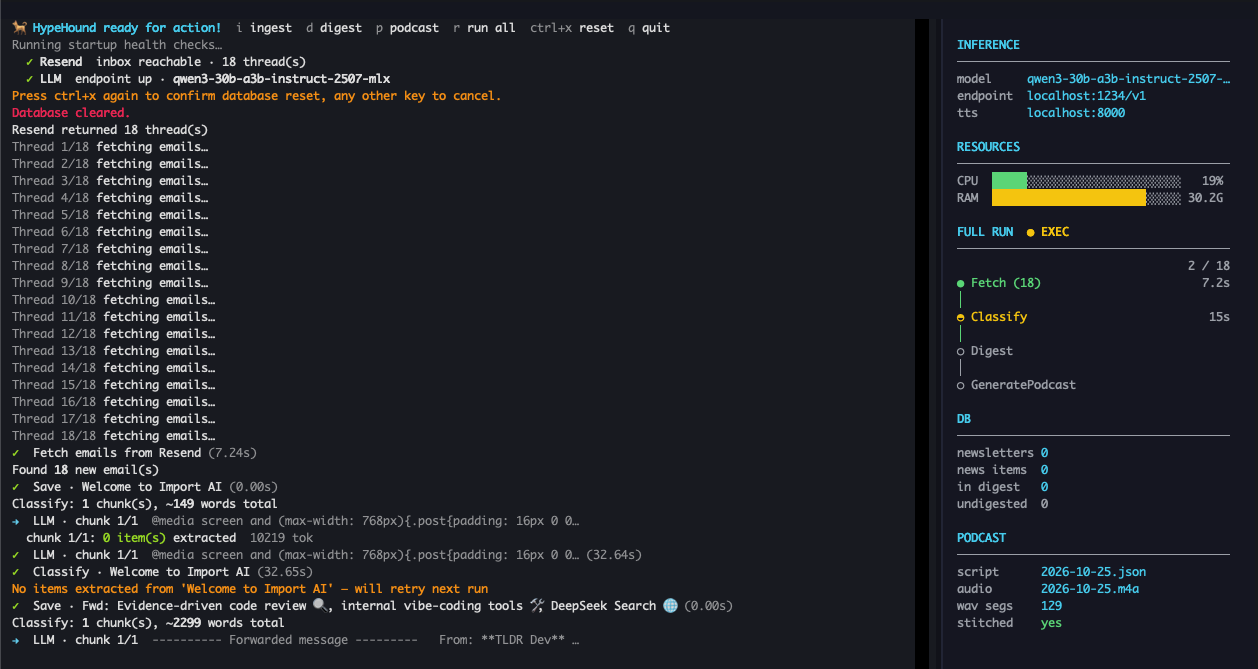
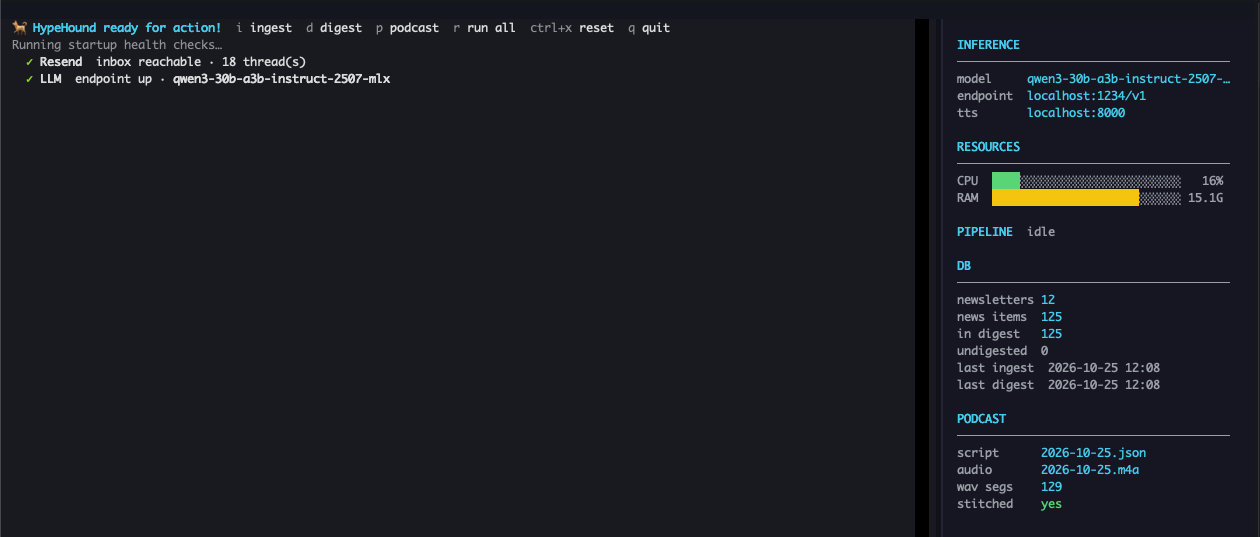
I use Textual for the interface. Two keybindings cover ninety percent of my use: i to run an
ingest, d to run a digest. The pipeline log streams into a RichLog widget in real time so I
can watch it work. There is a colour-coded stage indicator for each step that makes it easy to
see where time is actually being spent.
This is a debugging tool, not the intended production interface. The real goal is for HypeHound to run entirely in the background — a cron job fires the ingest and digest pipeline once or twice a day, and the result lands in my Telegram or email inbox without me having to open a terminal. The digest text arrives as a message, and optionally a narrated audio file is attached for listening on the way to work. The TUI exists so I can watch a run in detail when something goes wrong, not as the day-to-day interface.
A CLI would have been sufficient. The TUI is a convenience — watching a pipeline run with a progress display is easier to follow than scrolling log lines when something goes wrong.
The pipeline now has a headless publish step. Running python main.py --run-all --tts --publish
goes end to end without any interactive input: ingest, digest, podcast script, TTS synthesis,
episode HTML, and finally an Astro build and wrangler pages deploy to Cloudflare Pages. Audio
goes to a GitHub Release (the file is too large for Pages); the episode page references it by URL.
The same flow is available in the TUI as a single w keypress once a podcast has been generated.
The result lands at hypehound.dev a few seconds after the deploy completes.
What I have learned so far
Tracking URL resolution is a trade-off, not a solved problem. My first version stored URLs as-is, and when I audited items from a few days prior, a meaningful fraction of the citation links were dead — tracking redirects that had expired. So I added eager resolution at ingest time, following every redirect before storing. That fixed the dead-link problem but introduced a new one: resolving 40 URLs per newsletter, each with a 5-second timeout, made ingest appear frozen for minutes at a time.
The current version drops resolution entirely. Tracking URLs stay as-is in the database and are passed through as citations. The trade-off is deliberate: a user following a link in the digest triggers the redirect in their browser, where it generally still works. The pipeline stops trying to do something that is better left to the client — but this is a known limitation, and a smarter approach (async background resolution, caching) is on the list.
The other lesson is about structured output and trust. PydanticAI’s retry mechanism means I almost never get a malformed response, but it also means I can look at every item’s citations and trust that they are real URLs from the original email. Without that guarantee, I would have to post-validate everything I eventually published or forwarded. The schema acts as a contract between the LLM and the rest of the pipeline.
The dual-narrator podcast mode produces better content than I expected. The constraint — each speaker must produce a full paragraph, not a one-liner — forces the model to elaborate rather than acknowledge, and that results in more information per segment. Single-narrator mode is faster but feels thinner.
What is next
The ingest and digest pipeline is solid. The next area to explore is search: being able to ask a question across all stored items rather than waiting for the nightly digest. The SQLite full-text search extension is already available; I just need to wire it up. Beyond that, I want to experiment with per-sender configuration — some newsletters are worth summarising at item level, others are better treated as a single document and summarised in full.
The podcast coverage problem is solved. The next quality bar for that path is a depth parameter: a per-run setting that controls how much of the original item text is retained through to the digest and podcast scripts. The two audio samples already in this post show what the extremes look like. The goal is a controllable dial between them — a brief morning brief at the shallow end, a full deep-dive at the other — with the same pipeline and the same data underneath.
Voice and pacing is the other open question: finding a TTS voice that holds up at 1.5x speed, which is roughly how I consume audio, and tuning the per-category prompts so transitions between categories feel natural rather than abrupt.